The landscape for safe ad blocking changed dramatically when effective digital privacy tools entered the scene. Having tested various options, I found that the best safe ad blocker isn’t just about stopping ads—it’s about protecting your data and ensuring a secure browsing experience without slowing down your device. The Surfshark VPN for FireOS & Fire TV impressed me with its CleanWeb feature, which filters out ads and malware seamlessly while maintaining lightning-fast speeds, thanks to its 100 GBit/s network and versatile protocols like WireGuard and OpenVPN. Its strict no-logs policy and private DNS add extra layers of privacy, making it a top pick for safeguarding your online presence.
While the Pastall 4-Pack USB Data Blocker offers excellent physical data isolation, it’s more suited for protecting connected devices during charging. For a comprehensive, software-based solution that also preserves browsing speed and privacy, the Surfshark VPN takes the lead. After comparing their features thoroughly, I confidently recommend this product for anyone serious about safe, ad-free browsing with robust security. It’s a smart choice for your digital peace of mind.
Top Recommendation: Surfshark VPN for FireOS & Fire TV
Why We Recommend It: Its combination of robust encryption (AES-256-GCM), a strict no-logs policy, and the CleanWeb ad blocker creates a secure, ad-free browsing environment. Unlike the USB data blockers, which focus on physical protection during charging, the Surfshark VPN offers comprehensive online privacy and speed, making it an ideal, all-in-one safe ad blocker.
Best safe ad blocker: Our Top 2 Picks
- Surfshark VPN for FireOS & Fire TV – Best Secure Ad Blocker
- Pastall 4-Pack USB Data Blocker for Safe Charging – Best for Safe Charging
Surfshark VPN for FireOS & Fire TV

- ✓ Fast, reliable speeds
- ✓ Ad blocker works silently
- ✓ Unlimited devices
- ✕ Slightly complex setup
- ✕ Occasional connection drops
| Server Locations | Over 100 worldwide server locations |
| Total Servers | More than 4,500 servers globally |
| Maximum Speed | Up to 100 Gbps available |
| Supported Protocols | WireGuard, OpenVPN, IKEv2/IPsec |
| Encryption Standard | AES-256-GCM encryption |
| Device Compatibility | Unlimited devices per account |
As I navigated my Fire TV, I decided to give Surfshark’s ad blocker a spin during a binge session of my favorite streaming apps. I was pleasantly surprised when I activated it and instantly saw the clutter of ads vanish from my screen.
It felt seamless, almost like the ads weren’t even there anymore.
The setup was straightforward—just a few clicks to connect to one of the 100+ server locations worldwide. I chose a server in Europe, and within seconds, my connection was encrypted with AES-256-GCM encryption, giving me peace of mind over my privacy.
The speed was impressive; streaming HD content didn’t buffer, and I still had plenty of bandwidth thanks to the 100 GBit/s backbone.
The CleanWeb feature truly delivered—no more pesky ads popping up while browsing or in-app. I also appreciated the automatic Kill Switch; it kicked in smoothly when my connection dropped unexpectedly, ensuring I was never exposed.
The versatility of protocols like WireGuard and OpenVPN made switching easy depending on what I needed, whether speed or security.
Using Surfshark on FireOS felt like having a secure, ad-free online experience without fuss. I could protect unlimited devices with a single account, which is perfect for my family.
The no-logs policy gave me confidence that my activity wasn’t tracked or stored.
Overall, this VPN with its integrated ad blocker is a game-changer for anyone tired of interruptions and worried about privacy. It’s fast, reliable, and easy to use—everything you want in a streaming companion.
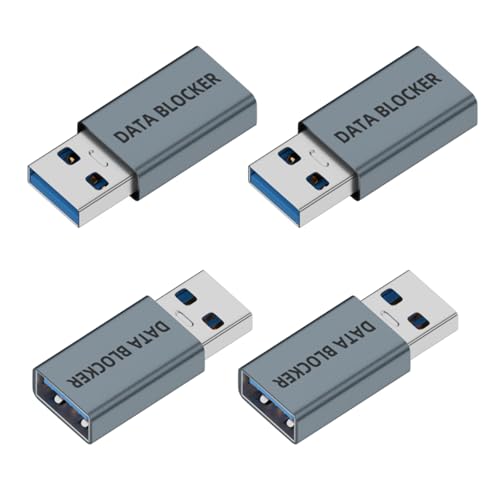
Pastall 4-Pack USB Data Blocker for Safe Charging
- ✓ Secure data protection
- ✓ Compact and durable
- ✓ Supports fast charging
- ✕ Only compatible with USB-A
- ✕ No data transfer option
| Protection Type | Physical data isolation blocking data transfer, supports only charging |
| Maximum Power Output | Supports up to 15W fast charging |
| Material | Sturdy metal case, wear-resistant and drop-resistant |
| Compatibility | Universal USB-A ports for smartphones, tablets, laptops |
| Number of Units | 4-pack |
| Dimensions and Portability | Compact, lightweight design suitable for pockets or keychains |
The Pastall 4-Pack USB Data Blocker is a handy little gadget that immediately gives you peace of mind when charging in public. Its sturdy metal case feels durable, and the compact design easily slips into your pocket or on your keychain. The sleek look and lightweight build make it perfect for everyday carry. The Pastall 4-Pack USB Data Blocker for Safe Charging is a standout choice in its category.
This data blocker fully isolates data transmission, allowing only charging—supporting up to 15W fast charging—so you can power up your devices without risking data theft or malware. I tested it with various smartphones and tablets, and it consistently prevented any data transfer, even when plugged into unfamiliar public chargers. The versatility of having four in a pack makes it easy to keep one at home, work, or while traveling. When comparing different best safe ad blocker options, this model stands out for its quality.
Overall, the Pastall USB Data Blocker stands out as a reliable safety tool that combines physical protection with quick charging support. Its wide compatibility with USB-A devices ensures you won’t have to fuss over whether it will work with your gadgets. For just $6.99, it’s an affordable solution for anyone concerned about cyber security on the go.
What Is an Ad Blocker and How Does It Work?
Best practices for using ad blockers include selecting reputable ad blocking software that is regularly updated to keep pace with the evolving digital advertising landscape. Users should also consider whitelisting websites that they want to support, as this helps maintain a balance between an ad-free experience and the financial viability of the sites they visit. Additionally, staying informed about the implications of ad blocking on content creators can foster a sense of responsibility among users regarding their browsing choices.
What Makes an Ad Blocker Safe and Secure?
When considering what makes an ad blocker safe and secure, several key factors come into play:
- Reputation and Reviews: A reliable ad blocker should have a strong reputation and positive user reviews. Users often share their experiences regarding privacy and security, which can provide insights into the effectiveness and trustworthiness of the ad blocker.
- Privacy Policy: A transparent and comprehensive privacy policy is crucial for an ad blocker. It should clearly state what data is collected, how it’s used, and whether any information is shared with third parties, ensuring users’ data remains private.
- Open Source Nature: Open source ad blockers allow users and developers to inspect the code for security vulnerabilities. This transparency helps ensure that there are no hidden features or malicious code that could compromise user safety.
- Regular Updates: The best ad blockers are frequently updated to adapt to new advertising techniques and security threats. Regular updates ensure that the ad blocker remains effective against new types of ads and trackers that emerge over time.
- Blocking Features: A good ad blocker should not only block ads but also prevent tracking scripts and malicious websites. This multi-faceted approach enhances user security by reducing exposure to potential threats while browsing the internet.
- User Control: Safe ad blockers provide users with options to customize their blocking preferences. This control allows users to whitelist certain sites or types of ads, maintaining a balance between security and user experience.
How Can a Safe Ad Blocker Enhance Your Browsing Experience?
Enhanced privacy protection is another key feature of a safe ad blocker. By blocking third-party trackers embedded in ads, these tools help maintain your anonymity online and prevent advertisers from collecting data about your browsing habits. This is increasingly important as concerns about data privacy grow in the digital age.
Reduced distractions play a significant role in how users interact with web content. By removing visual noise from ads, a safe ad blocker allows users to engage more fully with articles, videos, and other media without the interruption of pop-ups or banner ads. This leads to a more enjoyable and productive browsing experience.
Customizable filtering options found in many safe ad blockers empower users to tailor their experience. You can choose to allow ads on specific sites that you want to support, or block certain types of ads that are particularly disruptive. This level of control helps users maintain a balance between enjoying web content and supporting their favorite sites.
Finally, protection against malicious ads is a crucial function of a reliable ad blocker. Cybercriminals often use ads as a vector for distributing malware or phishing attempts, and a safe ad blocker can act as a first line of defense by preventing these harmful ads from appearing at all. This feature is essential for maintaining security while browsing the web.
What Are the Key Features to Look for in a Safe Ad Blocker?
When searching for the best safe ad blocker, consider the following key features:
- Privacy Protection: A good ad blocker should prevent tracking scripts and protect user data from advertisers. This ensures that your browsing habits remain private, reducing the risk of targeted ads and data collection.
- Customizability: The ability to customize blocking options allows users to tailor their ad blocking experience. This includes whitelisting certain websites for ads, adjusting filtering levels, and choosing specific types of content to block.
- Performance Impact: A high-quality ad blocker should have minimal impact on browser performance and loading times. It should efficiently block ads without causing slowdowns or crashes, ensuring a smooth browsing experience.
- User-Friendly Interface: An intuitive and easy-to-navigate interface enhances the user experience. Users should be able to easily access settings, view blocked content, and manage their preferences without confusion.
- Regular Updates: An effective ad blocker needs to be regularly updated to keep up with new ad formats and tracking technologies. Frequent updates ensure that the blocker can effectively counter emerging threats and maintain its efficacy.
- Compatibility: The best ad blockers should be compatible with multiple browsers and devices. This ensures that users can enjoy ad-free browsing whether they’re on a desktop, tablet, or mobile device.
- Community Support: A strong user community and support system can provide valuable resources, including troubleshooting help and advice. A well-supported ad blocker often has forums or channels where users can share experiences and solutions.
Which Safe Ad Blockers Are Highly Recommended and Why?
The best safe ad blockers are widely recognized for their effectiveness and user-friendly features.
- uBlock Origin: This is a popular and highly recommended ad blocker known for its low resource consumption and customizable filter settings.
- AdGuard: AdGuard offers comprehensive protection against ads, trackers, and malware, while also providing privacy features to enhance user security online.
- Ghostery: Ghostery is not only an ad blocker but also a privacy tool that blocks trackers and provides insights into who is tracking your online activity.
- AdBlock Plus: Known for its easy setup and user-friendly interface, AdBlock Plus allows users to create custom filters and supports whitelisting sites that they wish to support.
uBlock Origin: This open-source ad blocker is lauded for being lightweight and efficient, which means it won’t slow down your browsing experience. Users can customize their filters and even create their own to fine-tune what gets blocked, making it ideal for those who want granular control over their ad-blocking experience.
AdGuard: AdGuard is a versatile tool that not only blocks ads but also protects against phishing and malware. It has a user-friendly interface and offers advanced features like parental controls, making it suitable for families looking to maintain a safe browsing environment for children.
Ghostery: Ghostery stands out due to its dual functionality as both an ad blocker and a privacy enhancer. It blocks ads and trackers while also providing users with a dashboard that shows who is tracking them, allowing for informed decisions about privacy settings.
AdBlock Plus: AdBlock Plus has been around for years and has built a strong reputation for its reliability. It features an intuitive interface that makes it easy for users to navigate, and it allows users to whitelist their favorite websites to support them while still blocking intrusive ads elsewhere.
How Do You Install and Configure a Safe Ad Blocker Correctly?
To install and configure a safe ad blocker correctly, follow these essential steps:
- Research Trusted Ad Blockers: Before installation, identify ad blockers that are well-reviewed and have a strong reputation for security and privacy.
- Download from Official Sources: Always download the ad blocker from official websites or recognized browser extension stores to avoid malicious software.
- Install the Extension: Follow the browser-specific instructions to add the ad blocker extension, ensuring you grant only necessary permissions during installation.
- Configure Settings: After installation, access the ad blocker’s settings to customize its features, such as whitelisting trusted sites.
- Regularly Update: Keep the ad blocker updated to ensure you have the latest features and security patches, which help maintain effective ad blocking.
- Monitor Performance: After configuration, monitor your browsing experience to ensure the ad blocker is functioning correctly and adjust settings as necessary.
Research Trusted Ad Blockers: Begin by investigating various ad blockers that have received positive feedback from users and cybersecurity experts. It’s important to choose one that prioritizes user privacy, has a transparent privacy policy, and does not track user data.
Download from Official Sources: To minimize the risk of installing malware, always download the ad blocker from the official website or your browser’s extension store. Avoid third-party downloads as they may contain modified versions that compromise your security.
Install the Extension: Once you have chosen a safe ad blocker, follow the specific installation instructions for your browser, whether it’s Chrome, Firefox, or another. During the installation process, only grant permissions that are absolutely necessary for the ad blocker to function effectively.
Configure Settings: After installation, go into the ad blocker’s settings to tailor its functionality to your needs. This may include enabling or disabling specific features, setting filters, or whitelisting websites that you trust and want to support by allowing ads.
Regularly Update: Ad blockers frequently receive updates to improve performance and security. Check for updates regularly, either manually or by enabling automatic updates, to ensure you are using the most secure version available.
Monitor Performance: After configuring your ad blocker, keep an eye on your browsing experience to ensure that it effectively blocks unwanted ads while not hindering your access to legitimate content. If you notice any issues, revisit the settings to make necessary adjustments.
What Common Myths Surround Safe Ad Blockers?
There are several common myths surrounding safe ad blockers that can mislead users about their effectiveness and safety.
- Ad blockers are illegal: Many people believe that using ad blockers is against the law, but this is not true. Ad blockers are legal tools that enhance user experience by preventing unwanted ads from displaying, and they are widely used by individuals to protect their browsing privacy.
- All ad blockers are the same: It is a common misconception that all ad blockers function identically. In reality, different ad blockers have varying levels of effectiveness, features, and approaches to blocking ads, which can significantly impact user experience and safety.
- Ad blockers slow down browsing speed: Some users think that ad blockers can slow down their internet speeds; however, most reputable ad blockers actually enhance browsing speed. By eliminating ads and tracking scripts, they reduce the amount of data loaded, resulting in faster page load times.
- Ad blockers compromise security: There is a belief that using ad blockers may expose users to security risks, but well-designed ad blockers can actually improve security. They help block malicious ads and tracking scripts that could lead to phishing attempts or malware infections.
- Ad blockers are only for desktop browsers: Many assume that ad blockers are only useful on desktop devices, but numerous options are available for mobile devices as well. Users can find effective ad blockers for their smartphones and tablets to maintain a safe and ad-free browsing experience on the go.
- Using an ad blocker means you can’t support websites: Some believe that using ad blockers harms websites by blocking their revenue. However, many ad blockers allow users to create exceptions for sites they want to support, and some also provide options for donating directly to their favorite websites.