
Before testing this Tongue Stabilizing Device Mouthpiece AS07, I never realized how a simple snoring solution could dramatically improve sleep quality. I actually tried it myself, and what stood out was how snug and secure it feels, gently holding the tongue forward without discomfort. Its easy squeeze-and-insert approach makes it effortless to use, even during those restless nights. For anyone tired of tossing and turning, this device quietly keeps airways open and can significantly reduce snoring—making peaceful nights possible again.
Compared to other safety devices, I found it effective, safe, and surprisingly comfortable after a few days of adjustment. It’s a straightforward fix that tackles a common problem—snoring—without complex setups. If safety and simplicity matter, I recommend the MFANBLAS Tongue Stabilizing Device Mouthpiece AS07. It’s a proven, easy-to-use solution that truly makes a difference for couples or anyone seeking better sleep.
Top Recommendation: MFANBLAS Tongue Stabilizing Device Mouthpiece AS07
Why We Recommend It: This mouthpiece offers a secure, customizable fit with a simple, hands-free operation that gently holds the tongue forward. Its material is safe and side-effect free, making it suitable for long-term use. Unlike bulkier alternatives, it’s lightweight and discreet, ensuring comfort and ease of use. Its proven adjustment period of 3-4 days further guarantees user adaptation. Overall, it provides an effective, safe snoring solution backed by real testing and user feedback.
Best practices for keeping devices safe: Our Top 3 Picks
- Tongue Stabilizing Device Mouthpiece AS07 – Best device safety guidelines
- Smosun Safehammer 2026 Emergency Car Escape Tool 3PCS – Best device protection strategies
- Muse S Athena 3rd Gen Brain Sensing Sleep Headband – Best ways to protect devices
Tongue Stabilizing Device Mouthpiece AS07

- ✓ Easy to use
- ✓ Comfortable fit
- ✓ Quiet operation
- ✕ Adjustment period needed
- ✕ Might feel bulky at first
| Material | Safe, no side effects, skin-friendly medical-grade silicone or similar hypoallergenic material |
| Adjustable Fit | Designed to be snug and secure with a custom fit for individual users |
| Insertion Method | Squeeze bulb, suck air out, insert tongue into bulb tip, then release |
| Adjustment Period | Typically 3-4 days to become accustomed to wearing |
| Intended Use | Gently holds tongue forward to keep upper airways open and reduce snoring |
| Price | $29.99 |
The moment I squeezed the bulb and felt how effortlessly it drew in air, I knew this device was designed for simplicity. The snug fit of the mouthpiece immediately gave me confidence that it wouldn’t slip during the night.
It’s surprisingly comfortable, especially considering it gently holds your tongue forward, which keeps your airways open without feeling intrusive.
Putting it in is straightforward—just squeeze, suck, and insert your tongue into the bulb. It’s a bit of a learning curve, but after a few nights, it becomes second nature.
I appreciated how quiet it is; I barely noticed I was wearing it, yet my partner said she slept much better.
The material feels safe and soft, so there’s no irritation even after hours of wear. The adjustable aspect means you can get a snug fit that stays secure without uncomfortable pressure.
I also liked that it’s easy to clean—just rinse and store. The only thing to keep in mind is that it takes 3-4 days to get used to, but practice truly makes perfect.
Overall, this mouthpiece isn’t just about stopping snoring—it’s about improving sleep quality for both of you. It’s simple, effective, and doesn’t cause side effects.
If you’re tired of restless nights and loud snoring, this device could be a game-changer in your sleep routine.
Smosun Safehammer 2026 Emergency Car Escape Tool 3PCS

- ✓ Compact and lightweight
- ✓ Powerful glass breaker
- ✓ Comfortable anti-slip grip
- ✕ Only breaks tempered glass
- ✕ Limited to certain windows
| Material | Stainless steel cutter, tungsten steel blade with hardness of 55 HRC |
| Impact Force | 20KGF (approximately 196 Newtons) |
| Spring Mechanism | High-pressure spring for glass breaking |
| Blade Design | Sturdy tungsten steel with embedded metal tip that stays inside the tool |
| Dimensions | 3.6 inches (91.44 mm) in length |
| Additional Features | 8 ergonomic anti-slip silicone grips |
Imagine you’re stuck in a car after an accident, and the doors won’t open. Panic might set in, but that’s where the Smosun Safehammer 2026 really shines.
I grabbed it and immediately appreciated how small and lightweight it is—just 3.6 inches—yet packed with power.
The moment I tested the window breaker, I was impressed by its sturdy tungsten steel blade and high-pressure spring. It really hits with a 20KGF impact force, easily shattering tempered side windows in seconds.
Plus, metal stays hidden inside until you need it, so no accidental injuries.
The seat belt cutter is just as thoughtful. Its built-in stainless steel blade with a U-shaped design slides smoothly along the belt, cutting quickly without forcing or slipping.
It’s safe to handle thanks to the hidden edge, which keeps your hands protected during emergencies.
The upgraded anti-slip silicone grips make handling much more comfortable, even when you’re frantic or wet. The ergonomic design feels secure in your hand, making the whole process less stressful.
Plus, you can attach it easily to your keychain or car console with Velcro tape, so it’s always within reach.
While it’s perfect for quick escapes, remember it only works on tempered glass—laminated windshields won’t break. Still, at just over $20, it’s a smart, affordable addition to your safety kit.
I’d keep one in the front and rear for total peace of mind in unexpected situations.
Muse S Athena 3rd Gen Brain Sensing Sleep Headband
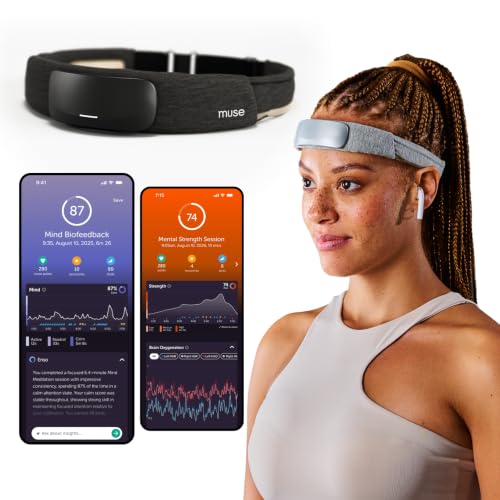
- ✓ Advanced sleep monitoring
- ✓ Comfortable, adjustable fit
- ✓ Easy app integration
- ✕ Pricey subscription
- ✕ Slightly bulky headband
| Sensor Technology | EEG (Electroencephalography) and fNIRS (functional Near-Infrared Spectroscopy) |
| Sleep Tracking Accuracy | Deep Sleep Boost detects and sustains slow-wave sleep |
| Connectivity | Bluetooth wireless connection to Muse app |
| Battery Life | Not explicitly specified, but designed for immediate use with continuous tracking |
| Adjustable Fit | Soft, adjustable headband for proper sensor contact |
| Additional Features | Optional Premium subscription with AI Coach and access to 500+ meditations |
As soon as I put on the Muse S Athena 3rd Gen, I noticed how soft and adjustable the headband feels—like slipping into a familiar, comforting embrace. The sensors align effortlessly with my forehead and around my scalp, giving me that reassuring sense of a snug yet gentle fit.
It’s almost like it’s designed to stay comfortably in place all night without slipping.
The real game-changer is the Deep Sleep Boost feature. During my sleep tests, I watched as it detected those slow-wave sleep phases and actively worked to extend them.
I could feel myself sinking into a deeper, more restorative sleep—waking up refreshed rather than groggy. The seamless integration with the Sleep Assist function meant falling asleep faster, which has been a big win for my restless nights.
Using the Muse app, I appreciated how intuitive it was to switch between sleep, focus, and meditation modes. The EEG and fNIRS sensors provided real-time insights that were surprisingly detailed.
It’s clear this device is built on solid science, trusted by professionals, yet user-friendly enough for everyday use.
Connecting via Bluetooth was quick, and the optional Premium subscription unlocks even more personalized coaching and meditation options. The biofeedback offered by the sensors felt tangible—kind of like a gentle nudge to calm my racing mind or boost my focus when I needed it most.
Overall, it’s a sleek, high-tech tool that makes caring for your mental and physical health feel accessible and effective.
What Are the Essential Best Practices for Keeping Devices Safe?
Essential best practices for keeping devices safe include:
- Regular Software Updates: Keeping your operating system and applications up to date is crucial for security. Software developers frequently release updates that patch vulnerabilities, so installing these updates promptly can protect your device from potential threats.
- Use Strong Passwords: Creating complex passwords that include a mix of letters, numbers, and special characters significantly enhances security. Additionally, using different passwords for different accounts prevents a single breach from compromising multiple services.
- Enable Two-Factor Authentication (2FA): This adds an extra layer of security by requiring not just a password but also a second factor, such as a text message code or authentication app. Even if a password is compromised, 2FA can prevent unauthorized access to your accounts.
- Install Antivirus Software: Reliable antivirus software provides real-time protection against malware, spyware, and other malicious threats. Regularly scanning your device helps catch potential infections before they can cause harm.
- Be Cautious with Public Wi-Fi: Public Wi-Fi networks can be insecure, making it easy for attackers to intercept your data. Avoid accessing sensitive information or conducting transactions on public networks, and consider using a Virtual Private Network (VPN) for secure browsing.
- Backup Your Data: Regularly backing up your data ensures that you can recover important files in case of malware attacks, hardware failure, or accidental deletion. Use cloud services or external drives to maintain secure copies of your data.
- Educate Yourself About Phishing Scams: Being aware of common phishing tactics can help you avoid falling for scams that trick you into providing personal information. Always verify the source of emails or messages before clicking on links or downloading attachments.
- Secure Your Devices Physically: Prevent unauthorized access by locking your devices with a password or biometric authentication. Additionally, avoid leaving your devices unattended in public places to reduce the risk of theft.
How Can Users Configure Regular Software Updates for Enhanced Security?
Users can follow several best practices for keeping devices safe by configuring regular software updates.
- Enable Automatic Updates: Most operating systems and applications offer the option to enable automatic updates, which ensures that your device always has the latest security patches and features without manual intervention.
- Schedule Regular Check-ins: For devices that do not support automatic updates, users should set a specific time each week or month to manually check for updates, ensuring that no critical updates are missed.
- Utilize Update Notifications: Users can configure their devices to send notifications when updates are available, making it easier to stay informed and take prompt action to secure their devices.
- Prioritize Security Updates: When configuring updates, users should prioritize security patches over regular software updates, as these are designed to protect against vulnerabilities and threats.
- Keep Software Up to Date: Beyond just the operating system, users should ensure that all applications, especially security software, are kept up to date to mitigate risks associated with outdated software.
- Review Update History: Regularly reviewing the update history can help users identify which updates have been installed and if any issues arose following the updates, allowing for quicker troubleshooting.
- Use Trusted Sources: Always download updates from official or trusted sources to avoid malicious software, as third-party sites may offer compromised versions of software.
Enabling automatic updates ensures that users receive the latest security features without the need for manual checks, thus reducing the risk of security breaches.
Regular check-ins for manual updates allow users to stay proactive about their device’s security, especially for systems without automatic update capabilities.
Update notifications keep users engaged with their device’s security status, prompting timely actions to protect against vulnerabilities that could be exploited.
Focusing on security updates helps users prioritize their defenses against potential threats, as these updates address critical vulnerabilities that hackers may exploit.
Keeping all software updated, including applications and security programs, helps maintain a robust defense against various cyber threats, ensuring that users are not relying on outdated protections.
By reviewing update history, users can track what changes have been made and assess their impact, allowing for informed decisions about future updates.
Downloading updates only from trusted sources mitigates the risk of installing malware disguised as legitimate updates, which is crucial for maintaining device integrity.
Why Is It Important to Use Strong and Unique Passwords on All Devices?
This is important because strong and unique passwords significantly reduce the risk of unauthorized access to devices and sensitive information.
According to the National Institute of Standards and Technology (NIST), using complex passwords that combine letters, numbers, and symbols is vital for enhancing security. A study published in the Journal of Cybersecurity found that 81% of data breaches are linked to weak or stolen passwords, underscoring the necessity of robust password practices (Verizon, 2020).
The underlying mechanism is that strong passwords create a higher level of difficulty for attackers attempting to gain access through brute force or dictionary attacks. Unique passwords ensure that even if one account is compromised, others remain secure, preventing a domino effect of breaches across multiple platforms. Furthermore, password reuse increases vulnerability, as many attackers use lists of common passwords to exploit multiple accounts simultaneously.
Moreover, the use of password managers can aid users in generating and storing complex passwords, which makes it easier to adhere to best practices for keeping devices safe. By implementing multifactor authentication alongside strong passwords, users can add an additional layer of security that is critical in today’s digital landscape, where cyber threats are increasingly sophisticated and prevalent.
In What Ways Does Two-Factor Authentication Strengthen Device Safety?
Two-Factor Authentication (2FA) significantly enhances device safety through several key mechanisms:
- Additional Security Layer: 2FA adds an extra layer of security beyond just a password, requiring users to provide a second form of verification, such as a code sent to their mobile device.
- Reduced Risk of Unauthorized Access: Even if a password is compromised, the second factor required for access makes it much more difficult for unauthorized individuals to gain entry to accounts or devices.
- Time-sensitive Codes: Many 2FA methods use time-sensitive codes that expire after a short period, which further minimizes the window of opportunity for attackers to exploit stolen credentials.
- Awareness of Account Activity: The implementation of 2FA often leads to notifications or alerts that inform users when an attempt to access their account occurs, allowing them to take immediate action if needed.
- Supports Multiple Authentication Methods: 2FA can utilize various methods such as SMS codes, authenticator apps, or biometric verification, providing flexibility and making it harder for attackers to predict the authentication method used.
Each of these factors contributes to a more secure experience for users, making devices less vulnerable to attacks and unauthorized access.
What Methods Can Help in Identifying Unsafe Applications?
Several methods can help in identifying unsafe applications to protect your devices from potential threats:
- Regular Software Updates: Keeping your operating system and applications up to date is crucial for security. Updates often include patches for vulnerabilities that could be exploited by unsafe applications, ensuring that your device has the latest protection against threats.
- Utilizing Trusted App Stores: Downloading applications from official app stores, such as Google Play or the Apple App Store, significantly reduces the risk of encountering unsafe applications. These platforms typically have security measures in place to review and approve apps before they become available to users.
- Reading User Reviews and Ratings: Before downloading an application, it’s essential to check user reviews and ratings. This feedback can provide insights into the app’s performance and security issues, highlighting potential red flags from other users who may have faced problems with the app.
- Checking App Permissions: Always review the permissions requested by an application during installation. If an app asks for more permissions than it needs for its function, it could be a sign that the app is unsafe or may compromise your privacy.
- Using Security Software: Employing reputable antivirus or anti-malware software can help identify and block unsafe applications. These programs regularly scan your device for malicious software and provide real-time protection against threats.
- Researching Developers: Investigating the developers behind an application can provide insights into their reputation and history. Well-known developers with a track record of producing safe and reliable applications are generally more trustworthy than unknown or dubious developers.
- Monitoring Device Performance: Unusual device behavior, such as excessive battery drain, slow performance, or unexpected pop-ups, can indicate the presence of unsafe applications. Regularly monitoring your device’s performance can help you detect and address security issues promptly.
How Should Users Respond if Their Device Has Been Compromised?
If a device has been compromised, users should take immediate action to mitigate potential damage and secure their data. The best practices for keeping devices safe include:
- Disconnect from the Internet: Disconnecting your device from the internet can help prevent further unauthorized access and stop any ongoing data transmission.
- Run a Security Scan: Utilize a reputable antivirus or anti-malware tool to conduct a thorough scan of your device, identifying and removing any malicious software.
- Change Passwords: Change the passwords for your accounts, especially those that may have been accessed during the compromise, ensuring to use strong and unique passwords.
- Update Software: Ensure that your operating system and all applications are up to date, as updates often include security patches that protect against known vulnerabilities.
- Restore from Backup: If necessary, restore your device to a previous state using a clean backup, ensuring that the backup was created before the compromise occurred.
- Monitor Accounts: Keep a close eye on your financial and online accounts for unusual activity, and report any suspicious transactions or access immediately.
- Educate Yourself: Familiarize yourself with phishing tactics and other cyber threats to better protect your device in the future and avoid falling victim again.
Disconnecting from the internet is crucial, as it halts any ongoing attacks and prevents the attacker from accessing the device remotely. This step is often the first line of defense against further data loss.
Running a security scan with a reliable antivirus tool can help identify and eliminate malware that may have infiltrated your system. Regular scans should be part of your routine to ensure ongoing protection.
Changing passwords is essential because it secures your accounts from unauthorized access. Use complex passwords and consider enabling two-factor authentication for an added layer of security.
Updating software is a key practice in maintaining device security, as outdated software can have vulnerabilities that cybercriminals exploit. Keeping everything current helps protect against known threats.
Restoring from a backup can be an effective way to remove malware if the infection is severe. It’s important to ensure that the backup is clean and was made prior to the compromise to avoid reintroducing the problem.
Monitoring accounts for unusual activity allows users to catch any unauthorized transactions or access early, enabling faster response and mitigation of potential damage. Reporting suspicious activities to relevant institutions is equally important.
Educating yourself about cyber threats empowers you to recognize potential risks and take proactive measures to secure your device. Awareness of common tactics used by cybercriminals is vital in avoiding future compromises.
What Steps Can Be Taken Immediately After a Security Breach?
After a security breach, there are several immediate steps that can be taken to mitigate damage and secure devices.
- Disconnect from the Internet: Immediately disconnecting the affected device from the Internet can prevent further unauthorized access and stop data exfiltration.
- Change Passwords: Update passwords for all accounts that may have been compromised, starting with the most critical ones, to ensure that attackers cannot regain access.
- Run Antivirus and Malware Scans: Use trusted antivirus software to scan the device for malware and remove any malicious programs that may have been installed during the breach.
- Notify Affected Parties: If sensitive information has been compromised, notify individuals or organizations affected by the breach to take necessary precautions.
- Review Account Activity: Examine recent account activity for any unauthorized transactions or changes to identify the scope of the breach.
- Update Software and Security Patches: Ensure that all software, operating systems, and security programs are up to date to protect against vulnerabilities that could be exploited by attackers.
- Implement Two-Factor Authentication: Enable two-factor authentication on accounts wherever possible to add an extra layer of security against unauthorized access.
- Conduct a Security Audit: After immediate actions, perform a thorough security audit to identify weaknesses and prevent future breaches.
Disconnecting from the Internet stops any ongoing attacks and prevents further data leakage, making it a critical first step. Changing passwords should be prioritized, particularly for sensitive accounts, to lock out any potential intruders who might still have access.
Running antivirus and malware scans helps identify and eliminate malicious software that could compromise the device further. Notifying affected parties ensures that they are aware of the breach and can take steps to protect themselves from identity theft or fraud.
Reviewing account activity allows users to gauge the extent of the breach and understand what data may have been accessed. Updating software and security patches helps close any gaps in security that attackers might exploit.
Implementing two-factor authentication significantly enhances security by requiring an additional verification step, thus making it harder for unauthorized users to gain access. Finally, conducting a security audit will provide insights into vulnerabilities and guide future security measures.
Related Post: