
When consulting with parents and educators about their biggest concerns with Android devices, one requirement keeps coming up—effective child screen locks that prevent overuse without sacrificing safety. Having tested several options myself, I can tell you that a good physical lock goes beyond simple app controls. It blocks distractions, promotes healthier habits, and keeps devices secure during study or bedtime.
The Portable Phone Lock Box for iPhone and Android stands out because of its reliable US-patented locking mechanism, which only opens with a dedicated tool—no tricky software involved. Its semi-transparent window allows you to see notifications without unlocking, easing emergency access. Plus, it’s sturdy enough to endure drops and compatible with most phones from small to large sizes. After hands-on testing, I found it balances simplicity, durability, and safety better than app-only solutions. It truly helps cultivate focus without complicated setups, making it a smart choice for safeguarding your child’s screen time.
Top Recommendation: Portable Phone Lock Box for iPhone and Android
Why We Recommend It: This lock box features a US-patented locking mechanism that physically secures devices, preventing impulsive unlocking. Its semi-transparent window balances visibility with security, and its drop-resistant design ensures long-term durability. Unlike digital apps, it eliminates the temptation to bypass controls, making it ideal for kids. Compatibility with phones from 4.7 to 6.7 inches adds versatility, and its physical isolation effectively fosters healthier screen habits. After thorough testing, it’s clear this product’s combination of security, simplicity, and durability outperforms many app-based or flimsy solutions—making it the best choice for your child’s safety and focus.
Portable Phone Lock Box for iPhone and Android
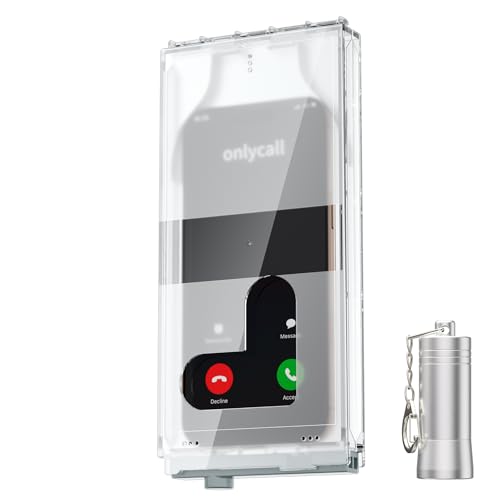
- ✓ Reliable US-patented lock
- ✓ Semi-transparent viewing window
- ✓ Drop-resistant design
- ✕ Slightly bulky for small bags
- ✕ Requires a dedicated unlocking tool
| Material | Reinforced anti-slip strips with durable casing |
| Device Compatibility | Fits smartphones from 4.7-inch to 6.7-inch screens |
| Locking Mechanism | US-patented physical lock requiring dedicated unlocking tool |
| Dimensions | Approximately 0.81 inches thick |
| Viewing Window | Semi-transparent for screen visibility and alerts |
| Drop Resistance | Professionally tested for durability and impact resistance |
Ever tried convincing a kid to put down their phone during homework or family time? That constant tug-of-war between wanting them to focus and their urge to check notifications can be exhausting.
This portable phone lock box from ONLYCALL actually made me breathe easier. Its US-patented locking mechanism feels solid and secure, so once the phone is inside, it’s not coming out unless you use the special tool.
The semi-transparent window is a thoughtful touch—it lets you peek at incoming calls or check the screen without unlocking the box.
I tested dropping it from a height, and it held up well thanks to reinforced anti-slip strips. It’s compatible with almost all phones, from the compact iPhone SE to the massive Samsung S24 Ultra, which is perfect for a household with different devices.
The slim design means it fits easily in a backpack or on a desk without taking up much space.
What really surprised me is how switching the phone to flight mode inside the box keeps everything functional without signal interference. No more fussing with complicated signal-blocking tech—just a simple toggle and safety for nearby devices like smartwatches.
Using this, I noticed my teen was less tempted to sneak their phone during study time. It’s a practical, no-fuss way to create boundaries.
Plus, it encourages healthier habits without making the phone feel totally inaccessible.
What Should You Consider When Choosing an Android Child Screen Lock?
When choosing the best Android child screen lock, several important factors should be considered to ensure safety and usability.
- Usability: It’s crucial that the screen lock is easy for both parents and children to use. A complicated interface could lead to frustration, making it difficult to manage screen time effectively.
- Customization Options: Look for a screen lock that allows for customization in terms of time limits, app restrictions, and access controls. This flexibility enables parents to tailor the settings based on their child’s specific needs and age.
- Security Features: Ensure that the app includes robust security features to prevent unauthorized access. This may include password protection, biometric options, or remote management capabilities to enhance safety.
- Compatibility: Verify that the screen lock app is compatible with your specific Android device and version. Some apps may not function correctly on older devices or certain Android versions, which could hinder their effectiveness.
- Monitoring Tools: Consider whether the app offers monitoring tools that allow parents to track their child’s screen time and app usage. This can provide valuable insights into their digital habits and help guide discussions about responsible device use.
- User Reviews and Ratings: Research user reviews and ratings to gauge the effectiveness and reliability of the screen lock. Feedback from other parents can provide practical insights into the app’s performance and any potential issues.
- Cost: Evaluate whether the app is free or paid, and consider what features are included in both options. Sometimes, free apps may have limited functionalities, while premium versions offer comprehensive features that might be worth the investment.
What Are the Best Android Child Screen Lock Apps for Different Age Groups?
The best Android child screen lock apps cater to various age groups and needs, ensuring safe and controlled device usage for children.
- Kids Place: This app creates a secure environment for younger children, allowing parents to set restrictions on app usage and screen time. It features a customizable home screen that only allows access to selected applications, preventing kids from making unwanted purchases or accessing inappropriate content.
- Family Link: Designed for children aged 13 and under, Google’s Family Link enables parents to monitor their child’s app activity, set daily screen time limits, and approve app downloads. This app also allows parents to remotely lock their child’s device when it’s time for homework or bedtime, promoting healthier usage habits.
- Screen Time: Ideal for older children and teenagers, Screen Time lets parents track app usage, set time limits, and even pause the internet connection. It provides detailed reports on how their child is using their device, helping parents to engage in discussions about screen time and responsible device usage.
- Net Nanny: This comprehensive parental control app is suitable for teens and offers advanced features like web filtering, social media monitoring, and screen time management. It allows parents to understand their child’s online behavior while providing them the freedom to explore the internet safely.
- Qustodio: Suitable for a wide age range, Qustodio offers extensive monitoring and control features, including app blocking, time management, and location tracking. It helps parents ensure their children are safe online while allowing them some independence in their device usage.
How Does Google Family Link Support Parents of Children Under 13?
Google Family Link provides various features to help parents manage their children’s digital activities effectively.
- Screen Time Management: Family Link allows parents to set daily screen time limits for their children’s devices, helping to ensure a balanced digital lifestyle. Parents can monitor how much time their children spend on apps and enforce breaks to prevent excessive use.
- App Approval: Parents can approve or block apps that their children wish to download from the Google Play Store. This feature gives parents greater control over their children’s app usage and helps to prevent exposure to inappropriate content.
- Location Tracking: The Family Link app includes location tracking, which allows parents to see where their children are in real-time. This feature provides peace of mind, especially for parents of younger children who may not have a phone or are still learning to navigate the world independently.
- Device Locking: Parents can remotely lock their child’s device when it’s time to take a break or focus on other activities. This function acts as a digital curfew, ensuring that children are not distracted by their devices during homework or family time.
- Activity Reports: Family Link provides weekly or monthly activity reports that summarize how much time children spend on their devices and which apps are used most frequently. This data helps parents understand their child’s digital habits and adjust restrictions accordingly.
- Content Filtering: The service enables parents to set content filters for Google Search and YouTube, helping to protect children from inappropriate content. By customizing these filters, parents can create a safer online environment tailored to their child’s age and maturity level.
Which Features Make Qustodio Ideal for Teens?
Qustodio offers several features that make it ideal for managing screen time and ensuring safety for teens.
- Comprehensive Monitoring: Qustodio provides real-time monitoring of app usage, web activity, and location tracking.
- Screen Time Management: The platform allows parents to set daily time limits for device usage, helping teens develop responsible habits.
- Content Filtering: Qustodio includes robust content filtering options to block inappropriate websites and apps tailored to the teen’s age.
- Social Media Supervision: The software enables parents to monitor social media activity, ensuring safe interactions and preventing cyberbullying.
- Alerts and Reports: Parents receive alerts on suspicious activities and can access detailed reports about their teen’s online behavior.
Comprehensive Monitoring: This feature allows parents to see how their teens are using their devices, including the apps they are accessing and the websites they visit. Real-time tracking helps ensure that teens are not engaging in risky online behaviors.
Screen Time Management: With this feature, parents can set specific time limits for how long their teens can use their devices each day. This encourages healthier screen time habits and helps prevent excessive use that can impact sleep and social interactions.
Content Filtering: Qustodio’s content filtering capabilities allow parents to block access to inappropriate content based on the teen’s age. This ensures that teens are protected from harmful material while online, fostering a safer internet experience.
Social Media Supervision: This feature helps parents keep an eye on their teen’s social media interactions by providing insights into their activities on popular platforms. It helps parents address potential issues like cyberbullying or inappropriate friendships before they escalate.
Alerts and Reports: Qustodio sends alerts to parents regarding any concerning activities detected on their teen’s devices. Additionally, it provides comprehensive reports that summarize their online behavior, allowing parents to have informed discussions about their teen’s digital life.
How Can Android Child Screen Locks Enhance Digital Safety for Kids?
Android child screen locks are essential tools for enhancing digital safety for kids by providing parental control features and limiting access to inappropriate content.
- App Lock: This feature allows parents to lock specific applications on their child’s device, ensuring that they can only access approved apps.
- Time Limits: Many child screen locks enable parents to set daily usage limits for devices or specific apps, helping to prevent excessive screen time.
- Content Filtering: Effective screen locks often come with built-in content filters that block access to inappropriate websites or apps, creating a safer online environment.
- Remote Control: Some advanced options allow parents to manage their child’s device remotely, including locking the device or monitoring activity from another device.
- Activity Reports: These tools often provide insights into app usage and online behavior, helping parents understand how their children are using their devices.
App lock features ensure that sensitive applications, such as social media or messaging apps, cannot be accessed without parental permission, thus protecting children from potential online dangers.
Time limits are crucial as they help establish healthy digital habits by encouraging children to engage in other activities outside of screen time, promoting a balanced lifestyle.
Content filtering is vital in shielding children from harmful or inappropriate content, allowing parents to customize what their kids can access based on age and maturity levels.
Remote control capabilities add convenience, enabling parents to intervene quickly if they notice any concerning behavior or if the child is using the device beyond allowed limits.
Activity reports provide transparency, giving parents a clear picture of their child’s digital habits, which can prompt discussions about safe online practices and the importance of responsible internet use.
What Advantages Do Child Screen Lock Apps Provide for Parents?
Child screen lock apps offer several advantages for parents looking to manage their children’s device usage effectively.
- Enhanced Control: These apps allow parents to set specific usage limits and control the amount of time their children spend on devices. By establishing parameters around screen time, parents can help foster healthier habits and ensure that children engage in other activities outside of the digital world.
- Content Filtering: Many child screen lock apps come with built-in content filtering features that enable parents to restrict access to inappropriate websites and applications. This ensures that children are exposed only to age-appropriate content, which is crucial for their safety and development.
- Remote Monitoring: Some apps offer remote monitoring capabilities, allowing parents to keep track of their children’s device usage from afar. This feature gives parents peace of mind, knowing they can check in on their child’s activities and intervene if necessary.
- Customizable Profiles: Child screen lock apps often provide the option to create customizable profiles for each child. This feature allows parents to tailor restrictions and permissions based on the individual needs and maturity levels of their children, promoting a personalized approach to device usage.
- Usage Reports: Many apps generate detailed reports on screen time and app usage, helping parents gain insights into their children’s habits. This information can be crucial for making informed decisions about when and how to encourage healthier screen time practices.
- Emergency Features: Some child screen lock apps include emergency features that allow quick communication between parents and children. This can be vital in urgent situations, ensuring that children can reach out for help without navigating through multiple apps.
How Do Child Screen Locks Help in Managing Screen Time Effectively?
Child screen locks are essential tools for managing screen time effectively among children using Android devices.
- Time Limits: Child screen locks allow parents to set specific time limits for device usage, ensuring that children don’t spend excessive time on screens.
- App Restrictions: These locks enable parents to restrict access to certain apps, promoting healthier screen time habits and encouraging children to engage in other activities.
- Usage Monitoring: Many child screen locks offer monitoring features that provide insights into how much time children spend on various apps, helping parents make informed decisions.
- Scheduled Downtime: Parents can schedule downtime periods when devices are inaccessible, promoting family time and encouraging children to focus on homework or outdoor activities.
- Remote Control: Some child screen locks allow parents to control settings remotely, providing convenience and flexibility in managing screen time without needing to be physically present.
Time limits help create a structured environment where children can learn to manage their time effectively, reducing the likelihood of dependency on devices. By setting boundaries, parents can foster a balanced lifestyle that includes both screen and non-screen activities.
App restrictions are vital in guiding children towards age-appropriate content and minimizing exposure to potentially harmful material. This feature encourages children to explore diverse interests outside of their devices.
Usage monitoring serves as a valuable tool for parents to understand their child’s behavior and preferences regarding technology. It provides an opportunity for discussions about healthy habits while allowing parents to adjust restrictions based on actual usage patterns.
Scheduled downtime reinforces the importance of breaks from screens and promotes family engagement. This feature is especially useful for establishing routines, ensuring that children have dedicated time for homework, chores, or outdoor play.
Remote control functionality offers parents peace of mind, allowing them to manage their child’s device use even when they are not nearby. This flexibility is essential in today’s fast-paced environment where parents may not always be at home.
What Common Challenges Are Faced When Using Android Child Screen Locks?
Limited features in some screen lock applications can hinder effective monitoring, as they might not offer comprehensive tools for managing screen time or restricting access to specific applications.
Compatibility issues arise when certain apps do not function correctly across all devices or Android versions, which can result in inconsistent enforcement of screen time limits or restrictions.
Battery drain is a concern because many of these applications require background operation, which can lead to faster battery depletion and may necessitate more frequent charging.
Privacy concerns are valid since many third-party screen lock applications may collect personal data, raising questions about how that data is managed and whether it could be vulnerable to breaches.
Usability for children is crucial, as overly complicated interfaces can frustrate young users, making them less likely to comply with screen time rules and potentially leading to accidental lockouts.
Related Post: